Up next in 10


How to use the Alexa shopping list while using Amazon Fresh
Show More Show Less View Video Transcript
0:06
good evening and welcome to the good
0:08
plates kitchen
0:10
if you've ever wondered how to add
0:12
something to your existing amazon
0:13
shopping list also known as the alexa
0:16
shopping list here's how to do it
0:19
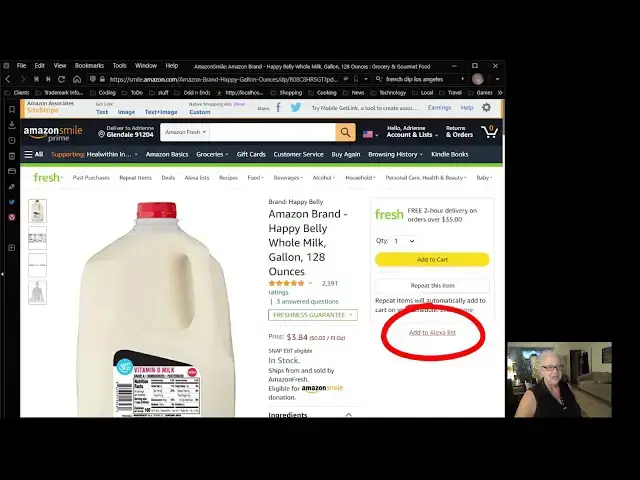
first find the item you want to add to
0:21
the list in this case
0:23
milk
0:25
then go towards the right hand side
0:27
of the screen and look for add to alexa
0:30
list which is right here notice right
0:32
there
0:33
okay and then press add to netflix list
0:37
and the item will be added
0:40
item added to list okay
0:43
now to use the alexa list look towards
0:45
the top of the screen
0:47
alexa lists
0:49
and you will see that the item was added
0:57
see there it is
1:00
now
1:03
notice the shop list button
1:05
towards the top of the screen when the
1:07
button is enabled the items can be added
1:09
to your cart without it the list can be
1:12
edited
1:14
so i'm going to take it off
1:17
now
1:17
you notice that there is a red earrings
1:20
on my list i added those a while ago and
1:23
then received them as a gift so i can
1:25
remove them from the list like so
1:28
delete
1:30
now they're deleted uh the other thing
1:33
you can do is you can uh
1:36
mark something
1:38
that's already been um
1:40
purchased
1:41
like i bought rice the other day just
1:43
the regular market so i'm gonna
1:45
mark that off the list has been
1:47
completed notice it's completed okay
1:49
and now i'm gonna put the shop list back
1:51
on and you can see i could add things to
1:55
the list
1:56
okay that's it i hope this was
1:57
informative for you and
1:59
we'll see you next time
2:01
[Music]
2:16
[Music]
2:25
you
#Food & Grocery Retailers